THE ARENA / CONTROLS
Martin Fighting Game Controls
Pick your player and input device. These are the defaults in original No Filter Fighters v12.9; remapping happens inside the game.
Original v12.9 · Checked October 21, 2026 · Build & test scope
← Back to the gameFind your default inputs
| Action | Player 1 keyboard |
|---|---|
| Move left / right | A / D |
| Jump / crouch | W / S |
| Light punch | F |
| Heavy punch | G |
| Light kick | V |
| Heavy kick | B |
| Special | H |
| Super 1 | T |
| Super 2 | Y |
| Call assist | C |
| Block | Hold back or R |
| Taunt | E |
| Launcher | S + G |
| Pause | Esc / Space |
Default bindings for v12.9. These selectors change this guide, not your game settings.
Player 1 and Player 2
In local Versus, P1 uses WASD with F/G/V/B attacks. P2 uses arrows with J/K/M/comma attacks. In solo modes, the code accepts both keyboard layouts for P1. Use the table above for specials, supers and assists.
Hold away from the opponent to block, or use R for P1 and Right Shift for P2. Press down plus heavy punch for a launcher. Double tap a direction to dash; down then up performs a super jump.
Touch controls
The original game adds a stick and action buttons on touch input. It is not a second website overlay. Touch operates P1; local two-player touch on one phone is not claimed.
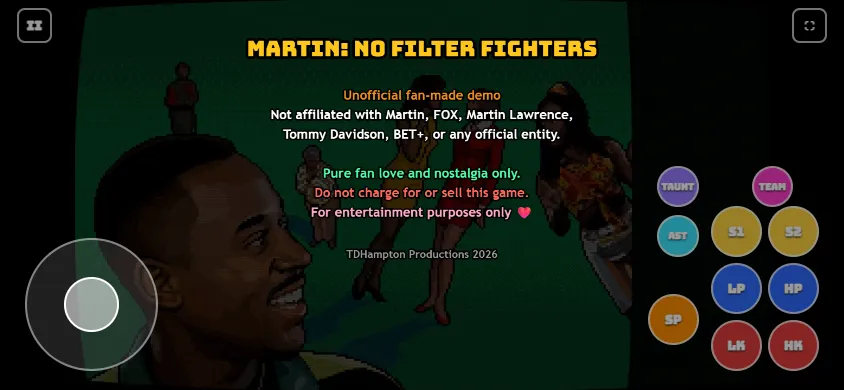
Controller setup
The code uses standard Gamepad API button indices shown in the table. Connect the controller, press a button so the browser can detect it, then check Settings. No physical Xbox, PlayStation or arcade stick has been tested in this environment. Touch/gamepad hot switching remains unverified.
Remap and reset
Open Settings from the mode menu to inspect the P1, P2 and gamepad tabs. Changing this page’s selector does not change those bindings. Record your bindings before resetting them; game settings are tied to the browser and origin.
Input troubleshooting
Click inside the game if inputs stop. Escape pauses; Shift+Escape returns focus to the site toolbar, and Tab can leave the embedded game. A keyboard’s simultaneous key limit may affect two-player play. Follow the input checks.